
Getcontact
Getverify LDACommunication
4.04.27K Reviews
- Version
- 8.16.0
- Installs
- 100.00M
- Age Rating
- Everyone
Screenshots
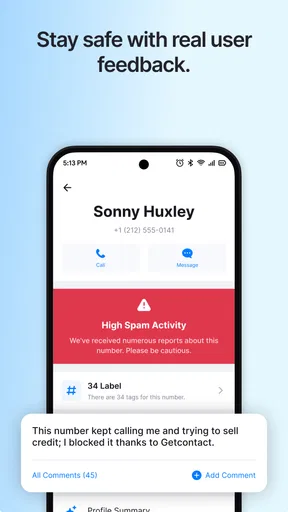
Our Review of Getcontact
 Analysis by Appyee
If you’ve ever been in a situation where an unknown number keeps buzzing your phone, you know the curiosity—or maybe frustration—that comes with it. Enter Getcontact, an app designed to alleviate those mystery calls and give you more control over your communication. I’ve given it a whirl, and here’s the lowdown on what this app brings to the table.
Where caller ID earns its place
I find caller identification most useful when it supports a quick decision, not when it pretends to deliver certainty. A call from an unfamiliar number might be a delivery, a work contact, or an unwanted sales pitch; a caller label can offer a clue, but it should not be treated as proof of identity. That distinction matters with a community-based approach, where labels can reflect how numbers appear in other people’s contact lists and may be incomplete, outdated, or simply unhelpful.
That makes this app a better fit for people who receive enough unfamiliar calls to want another screening signal. If your phone rarely rings with numbers you do not recognize, the extra step of installing and setting up a separate caller-ID app may not be worth it. I would also skip it if you expect every caller to be named correctly or want an identification result to replace your own judgement.
In ordinary use, I would keep the phone’s own call screen as the first point of reference and use Getcontact as a second opinion when a number looks unfamiliar. If the label is vague, I would let the call go to voicemail or check through a trusted channel rather than calling back immediately. This is a useful habit with any caller-ID service: a label can help you decide what to do next, but it cannot establish that the person on the other end is who they claim to be.
Unmasking the Unknown
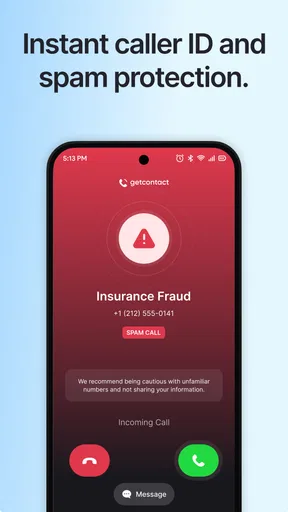
Let’s dive into the heart of what makes Getcontact tick. The app’s primary feature is its ability to identify unknown calls. You know those moments when you receive a call from a number you don’t recognize, and you have to decide whether it’s worth answering or not? With Getcontact, you get an instant ID check. It’s like having your own digital detective in your pocket, ready to reveal who’s behind that mysterious number.
How It Works
Installing the app is a breeze. Once you’ve got it up and running, Getcontact taps into a vast database of numbers, identifying callers by their names or how they are saved in other users’ contact lists. Pretty nifty, right? It’s a bit like crowdsourcing caller IDs, and it works surprisingly well for most numbers.
For a more reliable first impression, I would compare a displayed name with the context of the call rather than trusting the name alone. A local-looking number can still be unfamiliar, and a recognizable label does not guarantee that the call is legitimate. If I am expecting a callback, I would use the timing and my recent activity as well as the caller label; if I am not, I would avoid sharing personal details just because the screen displays a plausible name.
Against the built-in caller ID and spam filters found on many phones, Getcontact’s distinctive appeal is its community-derived perspective. The phone’s own tools can be simpler because they are already part of the calling experience, while a separate service may add another source of identification and spam signals. The trade-off is that a community label can be less relevant to your circumstances, and installing an additional app brings its own setup and privacy decisions. I would use it where that extra perspective is useful, not assume it must replace the native tools.
Getcontact is a communication app from Getverify LDA. It is free to install, is rated for Everyone, and its current version is 8.11.0, with Android support from version 8.0. It has been available since April 4, 2016, and its average rating is 3.8 from around 4.1 million ratings, with over 100 million installs. Those figures suggest broad use, but they do not tell me whether a particular caller label will be accurate or whether the app’s approach suits my privacy preferences. Optional in-app purchases range from $0.49 to $299.99 per item, so I would check the purchase details in the app before choosing anything paid; the basic download itself is free.
The Additional Perks
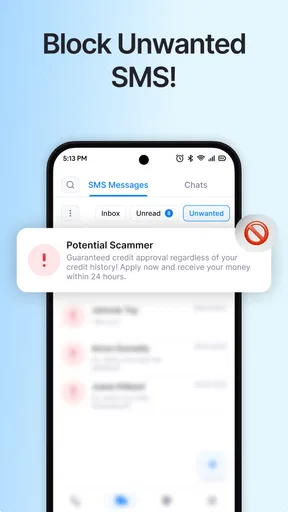
Beyond identifying unknown numbers, Getcontact offers a couple of extra goodies that are worth mentioning. You can also use it to block unwanted calls, which is a lifesaver if you’re constantly dodging telemarketers. The app keeps a log of blocked numbers, so you can review them anytime. Plus, there’s an option to report spam numbers, contributing to the community effort of keeping pesky callers at bay.
Blocking is most useful when you have a repeat nuisance number and want to stop handling the same interruption over and over. I would first check the number carefully, especially if it could belong to a service I use or someone trying to reach me about an appointment. A mistaken block can hide a call I actually need, so reviewing the blocked-number log occasionally is a sensible check rather than something to do only after a missed call becomes a problem.
Reporting spam is a small action with a collective purpose, but I would reserve it for calls I have a good reason to treat as unwanted. A missed call, an unfamiliar area code, or a name I do not recognize is not enough by itself to establish spam. This distinction helps keep my own choices measured: block a known repeat nuisance, report a clearly unwanted call, and leave uncertain cases unlabelled until there is more context.
For a realistic example, imagine I am waiting for a call about a delivery while several unfamiliar numbers have recently tried to reach me. A caller label can help me decide which call to answer, while the blocked list can keep a known persistent nuisance from interrupting again. If the delivery call does not match an expected detail, I can still ask the caller to identify the service without giving away personal information. The useful workflow is the combination of screening, restraint, and follow-up—not blindly accepting or rejecting every number the app classifies.
A Peek at Privacy
Now, I know what you’re thinking—what about privacy? It’s a valid concern when sharing your contact info with an app. Getcontact has a privacy policy in place, ensuring that your data isn’t misused. However, as with any app of this nature, it’s always wise to read the fine print and understand what data might be shared.
For me, the important question is not simply whether an app has a privacy policy, but what I am comfortable authorizing and what choices are visible during setup and use. I would read each permission prompt before approving it, check the app’s privacy information directly, and avoid granting access just because it makes setup feel faster. Permissions can differ by device and operating system, so I would make the decision on the screen in front of me rather than assume every installation requests the same things.
There is also a social side to a community-sourced caller database: labels connected with phone numbers can concern people who would rather keep their contact details out of such systems. I would not treat that concern as proof of a particular data practice, but I would take it seriously when deciding whether the service fits my boundaries. If you are uncomfortable with how caller information may be gathered or used, the simplest choice is to rely on your phone’s built-in call controls instead.
If you decide to try it, pause during onboarding instead of tapping through every screen. Note what the app asks you to allow, consider whether each choice is necessary for the way you plan to use it, and revisit the app’s settings and privacy information later if your comfort level changes. I would also look for account and privacy controls within the app and use the options that are clearly available, rather than assuming that uninstalling alone changes every account or data setting. The point is to make an informed choice, not to treat a privacy policy as a substitute for your own review.
One practical question is whether I need to keep using the app once I have identified or blocked a troublesome number. That depends on whether ongoing caller screening is valuable to me; if it is not, I can stop relying on the extra service and use the phone’s normal call controls. Before changing how I use it, I would check the current in-app account controls and the relevant privacy information so I understand the choices offered there. I would not infer a particular deletion or opt-out process without seeing it clearly presented.
Smooth Sailing or Bumpy Ride?
The interface of Getcontact is straightforward and user-friendly. Navigating through the app is intuitive, whether you’re a tech whiz or a tech newbie. However, there are occasional hiccups with caller identification not being 100% accurate, especially with less common numbers. But hey, it’s still a handy tool that works well most of the time.
The main limitation I keep in mind is that an identification result depends on the number being represented usefully in the service’s information. New, uncommon, or poorly labelled numbers may not produce a helpful answer, and even a confident-looking result can be wrong. That is why I would treat the app as a screening aid rather than a security tool. If a call involves money, account access, or sensitive information, I would verify the caller through an independent channel instead of relying on a name shown on the incoming call screen.
There is also a small day-to-day trade-off: any extra caller-ID service requires attention to its setup and settings, while the native phone experience may be enough for someone who only wants basic blocking. Someone who values a broader community signal may find the added step worthwhile; someone who wants the fewest apps and the least additional data handling may prefer to stay with their phone’s built-in options. Neither choice is universally right, and the app is most useful when its extra context solves a problem you actually have.
Getcontact is a poor match for anyone who needs guaranteed identification, dislikes community-based number labels, or does not want to review another app’s permissions and privacy choices. It is also not a replacement for careful call handling: I would never share a verification code, payment information, or account details because a caller label looks familiar. Those habits matter more than any identification result.
Who I’d Recommend It To
I would recommend trying Getcontact if unwanted calls are a recurring distraction and you want caller labels, call blocking, and a way to report numbers you consider spam in one communication app. Its free entry point makes it possible to see whether the extra screening perspective helps, while optional purchases mean I would check the price shown for any feature before buying. If your need is occasional, begin with the call controls already on your phone and add another app only if those tools leave a real gap.
For someone who handles calls for a small business, family, or community group, I would be especially cautious about treating labels as a shared directory or as a substitute for a contact-management system. Use the result to prompt a question, not to make a consequential decision on someone else’s behalf. For a personal phone receiving persistent nuisance calls, the more modest job of spotting and blocking repeat numbers is a clearer fit.
If you are deciding whether to keep it, I would ask three things: do unfamiliar calls happen often enough to justify another app, do the caller results help me make better decisions, and am I comfortable with the permissions and privacy choices I see? If the answers are yes, it may earn a place in your routine. If not, the built-in phone tools are a perfectly reasonable alternative, and there is no need to install a separate caller-ID service just because it is popular.
Overall, Getcontact is a solid choice if you’re looking to put an end to those annoying unknown calls. It’s easy to use, offers valuable features, and provides peace of mind. Whether you’re screening calls from potential clients or dodging spam, Getcontact is like having a personal assistant who’s always on the lookout. Give it a spin, and see how it transforms your calling experience!
How Getcontact Compares
Full ComparisonContacts suits people organizing and backing up their address book, Truecaller is the strongest fit for blocking spam calls, and Getcontact adds caller identification with privacy controls.
| App | Developer | Rating | Price |
|---|---|---|---|
 Contacts | Google LLC | 4.3 | Free |
 Truecaller: Spam Call Blocker | Truecaller | 4.4 | Free |
 GetcontactThis App | Getverify LDA | 4.0 | Free |
Verdict
Strengths of Getcontact
- Accurate caller ID and spam detection.
- User-friendly interface with quick navigation.
- Detailed call history and analysis.
- Customizable privacy settings.
- Supports multiple languages.
Limitations of Getcontact
- Limited features in the free version.
- Occasional incorrect spam labeling.
- Requires internet for full functionality.
- Privacy concerns with data sharing.
- Ads can be intrusive in free version.
Similar Picks in This Category
View All
Google Messages
Google LLC4.6

Gmail
Google LLC4.1

Google Meet
Google LLC4.4

Google Chrome
Google LLC4.1

WhatsApp Messenger
WhatsApp LLC4.6

Carrier Services
Google LLC4.2
Frequently Asked Questions
What is Getcontact and how does it work?
Getcontact is an application designed to enhance your communication by identifying unknown callers and blocking unwanted calls. It operates by accessing a vast database of phone numbers to provide caller identification and spam protection. Users can also see how their number is saved in other contacts, offering a unique social insight.
Is Getcontact safe to use?
Yes, Getcontact is generally considered safe, but users should be aware of privacy considerations. The app requires access to your contacts and call logs, which might raise privacy concerns for some users. It’s important to review the app’s privacy policy and terms of service to understand how your data is managed.
Does Getcontact require a subscription?
Getcontact offers both free and premium subscription plans. The free version includes basic features like caller identification and spam blocking. The premium subscription provides additional features such as advanced caller insights and ad-free experience. Users can choose the plan that best suits their needs and budget.
How accurate is Getcontact’s caller identification?
The accuracy of Getcontact’s caller identification can vary. It relies on its extensive database and user-contributed information. While it can effectively identify many unknown numbers, it might not always be 100% accurate. Regular updates and contributions from users help improve its accuracy over time.
Can I manage my privacy settings within Getcontact?
Yes, Getcontact allows you to manage your privacy settings. You can adjust permissions, control how your number is displayed to others, and decide which features to use. It’s advisable to explore the app’s settings to customize your privacy preferences according to your comfort level.
